




Have you ever heard about the web development life cycle?
No? Maybe? You’ve probably used a website that was built through one. Or maybe you’ve been in a meeting where someone dropped that phrase casually and you just nodded like you totally knew what they meant.
What happens between a website idea and its final launch? One day you’re scribbling concepts on a notepad, and the next thing you know, you’re knee-deep in design, development, and testing. Somewhere in between, timelines slip, bugs pop up, and scope creeps in silently.
That’s what the web development life cycle is meant to prevent. It’s the structure behind the screen. The hidden recipe that turns napkin sketches into real-world websites and full-blown web apps. And without it, chaos is almost guaranteed.
So in this guide, we’re walking through every step. Just clear, actionable insights on how websites are actually made. Whether you're working with a web development agency, hiring freelancers, or doing it yourself, this will give you the roadmap.
What Is The WDLC Or Web Development Life Cycle?
Let’s clear the fog a bit.
You hear this term tossed around a lot. Sometimes in pitch decks. Sometimes during onboarding calls. But what does it actually mean? The web development life cycle is just the full journey a website takes. From nothing to something. From a tiny spark of an idea to an actual live site you can Google.
But it’s not just coding and design. It’s not only for developers either.
It’s the entire process of web development best practices. Planning, designing, building, testing, launching, and taking care of the site after it’s live. All of it. Every piece matters. Keeping everything on track will help you align with the latest web design trends and web development technologies.
That’s why this cycle exists. To give structure to something that can get messy fast. It keeps your team on the same page. Designers know what to design. Developers know what to build. Clients know what to expect. No wild surprises. No guessing games.
You don’t need to be a techie to understand it. You just need to know the flow.
And that’s what we’re walking through next. Step by step. Ready? Let’s get into phase one. The part most people skip, but really shouldn't. Planning. The real MVP of the whole thing.
Why The Development Cycle Matters So Much
Does the WDLC really make a difference? We'll answer this through numbers.
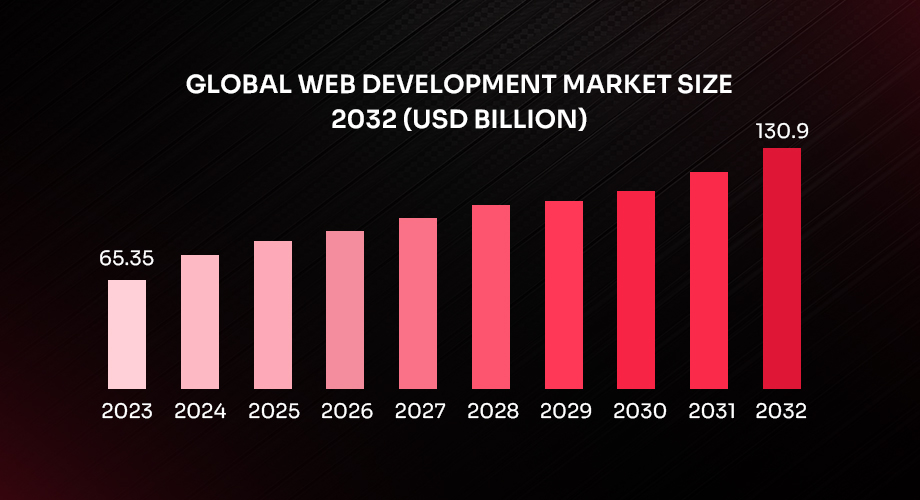
As the findings of a study by Business Research Insights reflect, the global web development market is on a strong growth trajectory, with its value estimated at USD 65.35 billion in 2023. And, guess what, over the next decade, it is projected to more than double, reaching around USD 130.9 billion by 2032, driven by a steady compound annual growth rate (CAGR) of 8.03%.
When you skip the website development stages, or code without a plan, this might lead to:
- Unexpected bugs
- Fnctionality issues
- Massive cost overruns
- Missed deadlines
- Frustrated clients & team
- A poor user experience
The web development life cycle creates alignment. It allows teams to set clear expectations, define responsibilities, track progress, and reduce confusion. And perhaps most importantly, it ensures that the final product actually serves its purpose, whether that’s to inform, convert, entertain, or sell.
The 7 Phases Of Web Development Life Cycle
Anyone who has heard about the WDLC has most probably heard of the 7 phases of web development life cycle. Search WDLC or ‘What Is Web Development Life Cycle,’ and your results will definitely include the phases.
Total seven, each phase is crucial. Each one builds on the previous. Think of it like chapters in a novel. You need to follow the story to truly understand the outcome.
Here’s the list with the names of each phase!
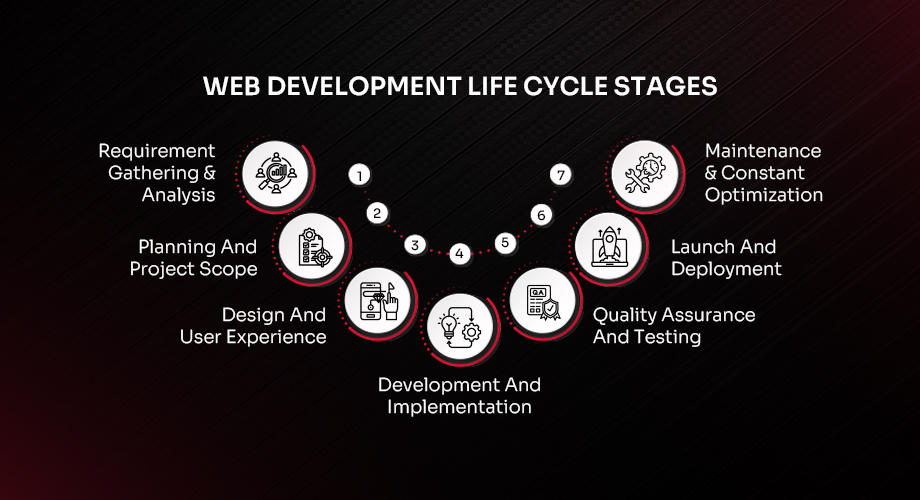
1. Requirement Gathering & Analysis
2. Planning And Project Scope
3. Design And User Experience
4. Development And Implementation
5. Quality Assurance And Testing
6. Launch And Deployment
7. Maintenance & Constant Optimization
1. Requirement Gathering and Analysis
This is where it all kicks off during the life cycle of web development. You’ve got a cool idea. Maybe even a rough sketch. But before anything can happen, we need to get serious about what this project actually is.
This is the phase where the team gets together and starts asking questions. Real questions. Not just "What should it look like?" but "Who’s it for?" and "What problem is it solving?"
Here’s what usually happens:
- You talk to stakeholders to understand what they really want
- Check out competitors and what they’re doing online
- Define the core purpose of the website
- Build basic user personas and map out use cases
- Estimate timelines, ballpark budgets
- Decide what kind of tech stack makes sense
This isn’t the time to start designing or coding. This is about getting aligned, setting the direction, and making sure everyone’s building the same thing, not just working off assumptions. When teams rush this part, things unravel later. So this step matters.
2. Planning And Project Scope
Now that you’ve got clarity on the big picture, it’s time to zoom in a little. What exactly are we building? How many pages? What features? Who’s doing what? And when? This stage is all about translating ideas into something structured. Not a wishlist. A plan.
You create documents. These ones are actually helpful:
- A list of features and requirements
- Flow diagrams or wireframes to show how users move through the site
- A breakdown of all pages and their purpose
- Technical notes for the developers
- A clear timeline of what’s happening, when, and by whom
This phase saves you from the “Hey, can we also add this one thing?” conversation that usually derails timelines. Once the scope is locked in, it gives everyone something solid to work against. Clients know what they’re getting. Teams know what to build. And you avoid surprises.
3. Design And User Experience
Now things start to get visual in the web development life cycle.
But this phase isn’t just about choosing a font or picking some colors. It’s about how your website feels to use. What happens when someone lands on the homepage? Where do they go? What grabs their attention? Designers step in here and turn wireframes into layouts. Not the final product, but close enough to feel real.
Here’s what’s going on:
- Basic wireframes turn into high-fidelity mockups
- Logos, color palettes, icons, and typography get finalized
- UI kits and component libraries might be created
- You map out how users move through the site
- Mobile and tablet versions are designed alongside desktop
This phase is often full of feedback and iteration. It’s the most visual part of the website design and development process, so everyone wants to weigh in. Which is fair. This is what people will see and interact with. A good design doesn’t just look nice. It makes things easy. It makes things feel right.
4. Development And Implementation
Design’s done. Looks great. Now it’s time to build the thing. This is where developers take over and start turning images and layouts into a working website. Code comes into play. Systems get set up. Content management platforms get integrated.
It’s usually split into two parts:
- Frontend development is everything you see on the screen
- Backend development is everything that powers what’s on the screen
So what’s happening during this phase?
- HTML, CSS, and JavaScript are written for layouts and animations
- Backend logic gets built, including databases and content structure
- CMS setup if the client needs to manage content
- Third-party tools or APIs are integrated
- Responsive testing as development happens
If this is a basic marketing site, development can go fast. But for more advanced builds, such as a portal, e-commerce store, or full web application development life cycle, things can get layered. Tools like React, Angular, or Vue might show up. And backend developers might be working with Node, Django, or something else, depending on the stack.
Either way, this is the phase where everything becomes real.
5. Quality Assurance And Testing
Now, before anyone clicks that big launch button, we test. This part’s not glamorous. But it is absolutely critical. You’re checking if buttons work. If pages load fast. If the site behaves the same in Chrome and Safari. If it still looks good on a tiny phone screen. You’re trying to break it so users won’t.
Things that get tested:
- Each feature on every page
- Different browsers and devices
- Performance, load times, and responsiveness
- Security holes or risky code
- Accessibility such as keyboard navigation and screen reader support
- Final approval with real users if possible
Testing isn’t just about finding bugs. It’s about confidence. Knowing the site works everywhere and for everyone. Only after this step is the website ready for the world.
6. Launch And Deployment
Launch day. Feels big. Probably is. But launching isn’t just uploading files and walking away. It’s crucial as a process of website development, and it needs to be done right to avoid headaches later.
Here’s what’s usually involved:
- Move everything from the staging server to the live server
- Point the domain to the right location
- Set up SSL so everything is secure
- Submit sitemaps to search engines
- Optimize for speed and mobile
- Create backups, monitoring, and fail-safes
After the launch, the team doesn’t just disappear. You’ll want to keep an eye on how the site performs in those first few days. Fix anything small. Monitor analytics. Make sure nothing broke in the move. When done right, a launch is smooth. When rushed, it turns into firefighting. Better to do it slow and steady.
7. Maintenance And Continuous Optimization
Here’s the part of the web development life cycle that a lot of people forget.
A website is not a one-time thing. It’s alive. It changes. It needs checkups, updates, and a little attention if you want it to keep working well.
Maintenance means more than fixing things when they break. It’s about improving the site over time based on how users behave, what the business needs, and how the market changes.
Stuff that happens here:
- Regular updates to plugins, libraries, or the CMS
- Adding new content or tweaking existing pages
- Running tests to improve conversions
- Watching analytics to spot user behavior trends
- Fixing bugs that didn’t show up right away
- Improving SEO based on performance data
This part, the website maintenance and optimization, is where growth happens. Website development stages always end here. It’s how a good site becomes a great one.
What Is The SDLC Methodology For Web Development?
Let’s take a step back for a second.
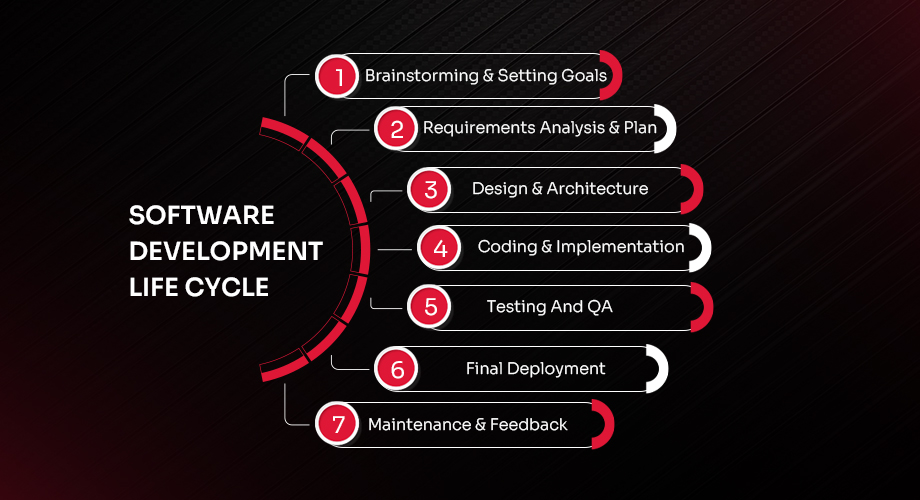
You’ve probably heard the term SDLC tossed around when people talk about apps or big software systems. It stands for Software Development Life Cycle. And yes, it fits into web development too, especially when the website you're building behaves more like software than a static page.
So, what’s the point of SDLC in web development?
It gives teams a formal, well-defined approach to building things. You don’t just wing it. There are steps. You plan, define, design, build, test, launch, and keep improving. Sounds familiar, right? That’s because the web development life cycle and SDLC follow similar stages.
But they’re not exactly the same.
The website development life cycle is often more flexible. It’s great for marketing sites, blogs, portfolios…the kind of projects where design and UX take center stage. You’re thinking about layout, color, flow, and content.
SDLC, on the other hand, gets pulled in when things get technical. Think dashboards, web apps, portals, CRMs, the kinds of builds where logic, data, and performance rule the game. This is when you need things like user authentication, advanced integrations, or high-security protocols. Here’s the main difference: SDLC focuses on system logic and internal functionality, while WDLC focuses on user interaction and frontend experience.
But at the end of the day, both aim to do the same thing: ship something that works, and keeps working. Many teams use elements from both, especially when building modern web apps, where the web application development life cycle merges with software planning. So, if your project needs high reliability, structured testing, and long-term scaling, bringing in SDLC principles helps a lot.
That’s why most web development companies and tech-heavy teams mix both. It’s not about choosing one over the other. It’s about knowing when to blend the two based on what you're building.
Development Methodologies That Shape The Cycle
Let’s talk about the different ways teams actually approach a project. Just like you can have different styles of cooking the same dish, you can also follow different methods to complete a project inside the website development process.
The website development methodology you choose can completely change how the project runs. The two most common methodologies are the Waterfall model and Agile model.
Waterfall Model
This is the traditional one for the web development life cycle. Everything is planned up front. Each phase must be completed before the next begins. It’s very structured.
- Works well for projects with fixed requirements
- Best when you already know exactly what you want
- Not ideal for evolving or experimental ideas
Agile Model
This one’s more flexible. It breaks the web development life cycle project into smaller parts and works in sprints.
- Great for projects that need to adapt over time
- Encourages fast iterations and regular feedback
- Common in startups and product-focused teams
Agile has become the go-to for many web development agencies today. Especially those working with evolving goals or client input throughout the build.
Some teams even mix both. They start with Waterfall for planning and switch to Agile for execution. The idea is to use the web development strategies that fit your team's speed, your client's needs, and the complexity of the project.
It’s not about following a textbook. It’s about finding the method that actually works for you.
A Glimpse Into The Future Of Web Development
Now, look ahead a bit. Web development today isn’t what it was even five years ago. Things are changing fast. Design is smarter. Code is faster. Users expect more. And honestly? If you're not keeping up, your site risks feeling outdated in no time.
So what’s shaping the future of web development?
- AI tools are now helping write code and generate layouts faster than ever
- No-code and low-code platforms are letting non-developers build solid prototypes
- Headless CMS setups are getting popular for better performance and flexibility
- Voice search, chatbots, and accessibility are becoming non-negotiables
- Sustainable web hosting is on the radar as green tech demand grows
Design-wise, you’ll see trends shifting toward ultra-fast experiences, minimalist UI, bold typography, and hyper-personalized content. So yes, staying updated with website design trends matters more than ever.
And from a tech standpoint? Expect more use of JavaScript frameworks, cloud services, and scalable APIs. These web development technologies are powering the next generation of dynamic, app-like websites. It’s no longer about just building a site. It’s about building a system that evolves with your users.
Time To Take Your Idea All The Way
So there it is. The full picture. You started with a scribble, maybe just an idea you’ve been meaning to explore. And now, you’ve seen what it actually takes to turn that into a live website, one that works, looks good, and keeps performing after it launches.
We’ve walked through the full web development life cycle, step by step. Talked about planning. Strategy. The build. The test. And the stuff that happens long after your site goes live. We even went into SDLC, and the different ways teams actually manage this whole process.
At this point, you’re not stuck guessing what comes next. You’ve got a map. A direction.
Whether you’re teaming up with a web development company, hiring a freelancer, or running things in-house, this cycle gives you structure. It clears out the chaos and helps everyone stay on track. The stages of website development aren't just boxes to check. They’re what make the difference between projects that fall apart and websites that keep growing.
So now what? Maybe you take that rough draft and start turning it into a real plan. Maybe you rebuild something that’s outdated and underperforming. Or maybe you just start. Wherever you are, this is your launchpad.
You’ve got the know-how. You’ve got the steps. Go take your idea all the way.